
Thunder VPN
Screenshots
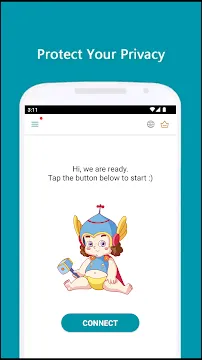

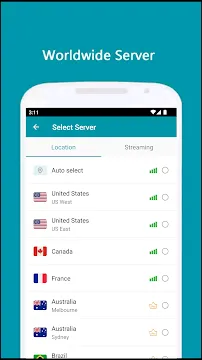
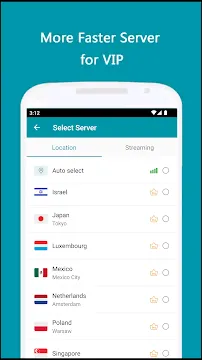
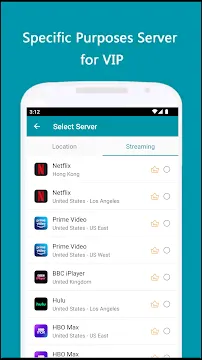
Thunder VPN For Android offers a fast and private way to browse the internet. It hides your real location. It encrypts your data. This Android app is free and easy to use. You do not need to sign up or register. You simply download it and tap a button. It works for beginners and advanced users alike.
How Thunder VPN Protects Your Privacy
Thunder VPN creates a secure tunnel for your online activity. This tunnel stops hackers from seeing your data. It also blocks your internet provider from tracking you. The app hides your IP address. That means websites see a different location. Your real identity stays hidden.
Public Wi-Fi is risky. Attackers often use these networks to steal information. Thunder VPN protects you in coffee shops, airports, and hotels. The app uses strong encryption. This encryption scrambles your data. Even if someone intercepts it, they cannot read it.
The app does not keep logs of your activity. This is a strict no-logs policy. The company does not store where you go online. They also do not record what you do. Your browsing history remains yours alone. This makes Thunder VPN a trustworthy choice for privacy.
Simple Setup and Easy Daily Use
You do not need technical skills to use Thunder VPN. First, go to the Google Play Store. Search for Thunder VPN. Tap install. Wait a few seconds. Then open the app. You see a large connect button. Tap it. The VPN turns on instantly.
The main screen shows your connection status. A green indicator means you are protected. You see a virtual location appear. This location is where websites think you are. You can change this location with a single tap. The app offers many server locations across the globe.
Using Thunder VPN daily is effortless. Set it to auto-connect when you start your phone. You can also whitelist certain apps. Keep them outside the VPN tunnel. For example, exclude banking apps or streaming services. This gives you control over your traffic.
Performance and Speed on Android Devices
Many people worry that VPNs slow down the internet. Thunder VPN minimizes this problem. The app uses lightweight technology. It does not drain your battery. It also uses few system resources. Your phone stays fast and responsive.
Speed depends on your original connection. However, Thunder VPN optimizes its servers for Android. You can browse websites without long delays. Video streaming works well. Social media feeds load quickly. For most daily tasks, you will not notice a slowdown.
The app switches between Wi-Fi and mobile data smoothly. You do not lose protection during the switch. It reconnects automatically. This feature keeps you safe while moving around. The connection remains stable and reliable.
Server Locations and Bypassing Restrictions
Thunder VPN provides servers in many countries. You can choose the United States, Japan, Germany, or Singapore. More locations become available frequently. Each server gives you a new IP address.
This feature helps you bypass censorship. Some schools or offices block websites. Thunder VPN lets you access those sites. You simply connect to a server in a free country. Then you browse without limits.
You can also access regional content. Watch videos that only play in certain countries. Read news sites that block foreign visitors. Use streaming apps while traveling abroad. The VPN makes your device look like it is in another country.
The app works for gaming too. Reduce lag by connecting to a nearby server. Hide your real IP from other players. Protect yourself from DDoS attacks. Thunder VPN helps you stay safe during online matches.
Free Tier and Premium Upgrades
Thunder VPN offers a generous free version. This version includes all core features. You get encryption, IP hiding, and no-logs policy. The free tier includes ads. Those ads support the service. You also get a limited number of server choices.
The premium version removes ads. It also gives you access to all servers. Premium users get faster speeds. They also receive priority customer support. The upgrade is affordable. You pay monthly or yearly. There are no long-term contracts.
Even the free tier is effective for basic privacy. Many users never need to upgrade. The free service does not sell your data. It remains secure and anonymous. You can use it every day without paying a cent.
Compatibility and System Requirements
Thunder VPN works on almost all Android devices. You need Android version 5.0 or higher. That covers phones and tablets released in the last seven years. The app is small. It takes less than 10 MB of storage space.
The app supports both smartphones and tablets. It works on devices with small screens. It also works on large Android tablets. The interface adjusts automatically. You do not need to install anything else.
Thunder VPN uses minimal battery life. It runs quietly in the background. You can keep it on all day. It will not slow down your other apps. The app also respects your phone’s doze mode. It saves power when you are not using it.
Final Thoughts
Thunder VPN for Android is a reliable privacy tool. It is simple enough for new users. It also offers enough features for experts. The app protects your data on public Wi-Fi. It hides your IP address from websites. You can bypass censorship and access regional content.
The free version works great for most people. The premium upgrade adds convenience. The no-logs policy keeps your activity private. You do not need to register or give personal details. Download Thunder VPN today. Tap connect. Start browsing with freedom and security.